1) Building a MultiThreaded Web Server; 2) Socket Programming Assignment 1: Web Server

1)Building a MultiThreaded Web Server

In this lab we will develop a Web server in two steps. In the end, you will have built a multithreaded

Web server that is capable of processing multiple simultaneous service requests in parallel. You should be able to demonstrate

that your Web server is capable of delivering your home page to a Web browser.

We are going to implement version 1.0 of HTTP, as defined in RFC 1945, where separate HTTP requests are sent

for each component of the Web page. The server will be able to handle multiple simultaneous service requests in

parallel. This means that the Web server is multithreaded.

In the main thread, the server listens to a fixed port.

When it receives a TCP connection request, it sets up a TCP connection through another port and services the

request in a separate thread. To simplify this programming task, we will develop the code in two stages. In the first

stage, you will write a multithreaded

server that simply displays the contents of the HTTP request message that it

receives. After this program is running properly, you will add the code required to generate an appropriate response.

As you are developing the code, you can test your server from a Web browser. But remember that you are not

serving through the standard port 80, so you need to specify the port number within the URL that you give to your

browser. For example, if your machine’s name is host.someschool.edu, your server is listening to port 6789, and

you want to retrieve the file index.html, then you would specify the following URL within the browser:

http://host.someschool.edu:6789/index.html

If you omit “:6789”, the browser will assume port 80 which most likely will not have a server listening on it.

When the server encounters an error, it sends a response message with the appropriate HTML source so that the

error information is displayed in the browser window.

Web Server in Java: Part A

In the following steps, we will go through the code for the first implementation of our Web Server. Wherever you see

“?”, you will need to supply a missing detail.

Our first implementation of the Web server will be multithreaded,

where the processing of each incoming request

will take place inside a separate thread of execution. This allows the server to service multiple clients in parallel, or

to perform multiple file transfers to a single client in parallel. When we create a new thread of execution, we need to

pass to the Thread’s constructor an instance of some class that implements the Runnable interface. This is the

reason that we define a separate class called HttpRequest. The structure of the Web server is shown below:

import java.io.* ;

import java.net.* ;

import java.util.* ;

public final class WebServer

{

public static void main(String argv[]) throws Exception

{

. . .

}

}

final class HttpRequest implements Runnable

{

. . .

}

Normally, Web servers process service requests that they receive through wellknown port number 80. You can choose any port higher than 1024, but remember to use the same port number when making requests to your Web

server from your browser.

public static void main(String argv[]) throws Exception

{

// Set the port number.

int port = 6789;

. . .

}

Next, we open a socket and wait for a TCP connection request. Because we will be servicing request messages

indefinitely, we place the listen operation inside of an infinite loop. This means we will have to terminate the Web

server by pressing ^C on the keyboard.

// Establish the listen socket.

?

// Process HTTP service requests in an infinite loop.

while (true) {

// Listen for a TCP connection request.

?

. . .

}

When a connection request is received, we create an HttpRequest object, passing to its constructor a reference to

the Socket object that represents our established connection with the client.

// Construct an object to process the HTTP request message.

HttpRequest request = new HttpRequest( ? );

// Create a new thread to process the request.

Thread thread = new Thread(request);

// Start the thread.

thread.start();

In order to have the HttpRequest object handle the incoming HTTP service request in a separate thread, we first

create a new Thread object, passing to its constructor a reference to the HttpRequest object, and then call the

thread’s start() method.

After the new thread has been created and started, execution in the main thread returns to the top of the message

processing loop. The main thread will then block, waiting for another TCP connection request, while the new thread

continues running. When another TCP connection request is received, the main thread goes through the same

process of thread creation regardless of whether the previous thread has finished execution or is still running.

This completes the code in main(). For the remainder of the lab, it remains to develop the HttpRequest class.

We declare two variables for the HttpRequest class: CRLF and socket. According to the HTTP specification, we

need to terminate each line of the server’s response message with a carriage return (CR) and a line feed (LF), so we

have defined CRLF as a convenience. The variable socket will be used to store a reference to the connection

socket, which is passed to the constructor of this class. The structure of the HttpRequest class is shown below:

final class HttpRequest implements Runnable

{

final static String CRLF = “\r\n”;

Socket socket;

// Constructor

public HttpRequest(Socket socket) throws Exception

{

this.socket = socket;

}

// Implement the run() method of the Runnable interface.

public void run()

{

. . .

}

private void processRequest() throws Exception

{

. . .

}

}

In order to pass an instance of the HttpRequest class to the Thread’s constructor, HttpRequest must implement

the Runnable interface, which simply means that we must define a public method called run() that returns void.

Most of the processing will take place within processRequest(), which is called from within run().

Up until this point, we have been throwing exceptions, rather than catching them. However, we can not throw

exceptions from run(), because we must strictly adhere to the declaration of run() in the Runnable interface,

which does not throw any exceptions. We will place all the processing code in processRequest(), and from there,

throw exceptions to run(). Within run(), we explicitly catch and handle exceptions with a try/catch block.

// Implement the run() method of the Runnable interface.

public void run()

{

try {

processRequest();

} catch (Exception e) {

System.out.println(e);

}

}

Now, let’s develop the code within processRequest(). We first obtain references to the socket’s input and output

streams. Then we wrap InputStreamReader and BufferedReader filters around the input stream. However, we

won’t wrap any filters around the output stream, because we will be writing bytes directly into the output stream.

private void processRequest() throws Exception

{

// Get a reference to the socket’s input and output streams.

InputStream is = ?;

DataOutputStream os = ?;

// Set up input stream filters.

?

BufferedReader br = ?;

. . .

}

Now we are prepared to get the client’s request message, which we do by reading from the socket’s input stream.

The readLine() method of the BufferedReader class will extract characters from the input stream until it reaches

an endofline character, or in our case, the endofline character sequence CRLF.

The first item available in the input stream will be the HTTP request line. (See Section 2.2 of the textbook for a

description of this and the following fields.)

// Get the request line of the HTTP request message.

String requestLine = ?;

// Display the request line.

System.out.println();

System.out.println(requestLine);

After obtaining the request line of the message header, we obtain the header lines. Since we don’t know ahead of

time how many header lines the client will send, we must get these lines within a looping operation.

// Get and display the header lines.

String headerLine = null;

while ((headerLine = br.readLine()).length() != 0) {

System.out.println(headerLine);

}

We don’t need the header lines, other than to print them to the screen, so we use a temporary String variable,

headerLine, to hold a reference to their values. The loop terminates when the expression

(headerLine = br.readLine()).length()

evaluates to zero, which will occur when headerLine has zero length. This will happen when the empty line

terminating the header lines is read. (See the HTTP Request Message diagram in Section 2.2 of the textbook)

In the next step of this lab, we will add code to analyze the client’s request message and send a response. But

before we do this, let’s try compiling our program and testing it with a browser. Add the following lines of code to

close the streams and socket connection.

// Close streams and socket.

os.close();

br.close();

socket.close();

After your program successfully compiles, run it with an available port number, and try contacting it from a browser.

To do this, you should enter into the browser’s address text box the IP address of your running server. For example,

if your machine name is host.someschool.edu, and you ran the server with port number 6789, then you would

specify the following URL:

http://host.someschool.edu:6789/

The server should display the contents of the HTTP request message. Check that it matches the message format

shown in the HTTP Request Message diagram in Section 2.2 of the textbook.

Web Server in Java: Part B

Instead of simply terminating the thread after displaying the browser’s HTTP request message, we will analyze the

request and send an appropriate response. We are going to ignore the information in the header lines, and use only

the file name contained in the request line. In fact, we are going to assume that the request line always specifies the

GET method, and ignore the fact that the client may be sending some other type of request, such as HEAD or

POST.

We extract the file name from the request line with the aid of the StringTokenizer class. First, we create a

StringTokenizer object that contains the string of characters from the request line. Second, we skip over the

method specification, which we have assumed to be “GET”. Third, we extract the file name.

// Extract the filename from the request line.

StringTokenizer tokens = new StringTokenizer(requestLine);

tokens.nextToken(); // skip over the method, which should be “GET”

String fileName = tokens.nextToken();

// Prepend a “.” so that file request is within the current directory.

fileName = “.” + fileName;

Because the browser precedes the filename with a slash, we prefix a dot so that the resulting pathname starts

within the current directory.

Now that we have the file name, we can open the file as the first step in sending it to the client. If the file does not

exist, the FileInputStream() constructor will throw the FileNotFoundException. Instead of throwing this possible exception and terminating the thread, we will use a try/catch construction to set the boolean variable

fileExists to false. Later in the code, we will use this flag to construct an error response message, rather than try

to send a nonexistent file.

// Open the requested file.

FileInputStream fis = null;

boolean fileExists = true;

try {

fis = new FileInputStream(fileName);

} catch (FileNotFoundException e) {

fileExists = false;

}

There are three parts to the response message: the status line, the response headers, and the entity body. The

status line and response headers are terminated by the character sequence CRLF. We are going to respond with a

status line, which we store in the variable statusLine, and a single response header, which we store in the

variable contentTypeLine. In the case of a request for a nonexistent file, we return 404 Not Found in the status

line of the response message, and include an error message in the form of an HTML document in the entity body.

// Construct the response message.

String statusLine = null;

String contentTypeLine = null;

String entityBody = null;

if (fileExists) {

statusLine = ?;

contentTypeLine = “Content‐type: ” +

contentType( fileName ) + CRLF;

} else {

statusLine = ?;

contentTypeLine = ?;

entityBody = “<HTML>” +

“<HEAD><TITLE>Not Found</TITLE></HEAD>” +

“<BODY>Not Found</BODY></HTML>”;

}

When the file exists, we need to determine the file’s MIME type and send the appropriate MIMEtype

specifier. We make this determination in a separate private method called contentType(), which returns a string that we can

include in the content type line that we are constructing.

Now we can send the status line and our single header line to the browser by writing into the socket’s output

stream.

// Send the status line.

os.writeBytes(statusLine);

// Send the content type line.

os.writeBytes(?);

// Send a blank line to indicate the end of the header lines.

os.writeBytes(CRLF);

Now that the status line and header line with delimiting CRLF have been placed into the output stream on their way

to the browser, it is time to do the same with the entity body. If the requested file exists, we call a separate method

to send the file. If the requested file does not exist, we send the HTMLencoded error message that we have prepared.

// Send the entity body.

if (fileExists) {

sendBytes(fis, os);

fis.close();

} else {

os.writeBytes(?);

}

After sending the entity body, the work in this thread has finished, so we close the streams and socket before

terminating.

We still need to code the two methods that we have referenced in the above code, namely, the method that

determines the MIME type, contentType(), and the method that writes the requested file onto the socket’s output

stream. Let’s first take a look at the code for sending the file to the client.

private static void sendBytes(FileInputStream fis, OutputStream os)

throws Exception

{

// Construct a 1K buffer to hold bytes on their way to the socket.

byte[] buffer = new byte[1024];

int bytes = 0;

// Copy requested file into the socket’s output stream.

while((bytes = fis.read(buffer)) != ‐1 ) {

os.write(buffer, 0, bytes);

}

}

Both read() and write() throw exceptions. Instead of catching these exceptions and handling them in our code,

we throw them to be handled by the calling method.

The variable, buffer, is our intermediate storage space for bytes on their way from the file to the output stream.

When we read the bytes from the FileInputStream, we check to see if read() returns minus one, indicating that

the end of the file has been reached. If the end of the file has not been reached, read() returns the number of bytes

that have been placed into buffer. We use the write() method of the OutputStream class to place these bytes

into the output stream, passing to it the name of the byte array, buffer, the starting point in the array, 0, and the

number of bytes in the array to write, bytes.

The final piece of code needed to complete the Web server is a method that will examine the extension of a file

name and return a string that represents it’s MIME type. If the file extension is unknown, we return the type

application/octet‐stream.

private static String contentType(String fileName)

{

if(fileName.endsWith(“.htm”) || fileName.endsWith(“.html”)) {

return “text/html”;

}

if(?) {

?;

}

if(?) {

?;

}

return “application/octet‐stream”;

}

There is a lot missing from this method. For instance, nothing is returned for GIF or JPEG files. You may want to

add the missing file types yourself, so that the components of your home page are sent with the content type

correctly specified in the content type header line. For GIFs the MIME type is image/gif and for JPEGs it is

image/jpeg.

This completes the code for the second phase of development of your Web server. Try running the server from the

directory where your home page is located, and try viewing your home page files with a browser. Remember to

include a port specifier in the URL of your home page, so that your browser doesn’t try to connect to the default port

80. When you connect to the running web server with the browser, examine the GET message requests that the

web server receives from the browser.

——————————————————————————————————————————-

2) Socket Programming Assignment 1: Web Server

Socket Programming Assignment 1: Web Server

In this lab, you will learn the basics of socket programming for TCP connections in Python: how to create a socket, bind it to a specific address and port, as well as send and receive a HTTP packet. You will also learn some basics of HTTP header format.

You will develop a web server that handles one HTTP request at a time. Your web server should accept and parse the HTTP request, get the requested file from the server’s file system, create an HTTP response message consisting of the requested file preceded by header lines, and then send the response directly to the client. If the requested file is not present in the server, the server should send an HTTP “404 Not Found” message back to the client.

Code

Below you will find the skeleton code for the Web server. You are to complete the skeleton code. The places where you need to fill in code are marked with #Fill in start and #Fill in end. Each place may require one or more lines of code.

Running the Server

Put an HTML file (e.g., HelloWorld.html) in the same directory that the server is in. Run the server program. Determine the IP address of the host that is running the server (e.g., 128.238.251.26). From another host, open a browser and provide the corresponding URL. For example:

http://128.238.251.26:6789/HelloWorld.html

‘HelloWorld.html’ is the name of the file you placed in the server directory. Note also the use of the port number after the colon. You need to replace this port number with whatever port you have used in the server code. In the above example, we have used the port number 6789. The browser should then display the contents of HelloWorld.html. If you omit “:6789”, the browser will assume port 80 and you will get the web page from the server only if your server is listening at port 80.

Then try to get a file that is not present at the server. You should get a “404 Not Found” message.

What to Hand in

You will hand in the complete server code along with the screen shots of your client browser, verifying that you actually receive the contents of the HTML file from the server.

Skeleton Python Code for the Web Server

#import socket module

from socket import *

serverSocket = socket(AF_INET, SOCK_STREAM)

#Prepare a sever socket

#Fill in start

#Fill in end

while True:

#Establish the connection

print ‘Ready to serve…’

connectionSocket, addr = #Fill in start #Fill in end

try:

message = #Fill in start #Fill in end

filename = message.split()[1]

f = open(filename[1:])

outputdata = #Fill in start #Fill in end

#Send one HTTP header line into socket

#Fill in start

#Fill in end

#Send the content of the requested file to the client

for i in range(0, len(outputdata)):

connectionSocket.send(outputdata[i])

connectionSocket.close()

except IOError:

#Send response message for file not found

#Fill in start

#Fill in end

#Close client socket

#Fill in start

#Fill in end

serverSocket.close()

Optional Exercises

1. Currently, the web server handles only one HTTP request at a time. Implement a multithreaded server that is capable of serving multiple requests simultaneously. Using threading, first create a main thread in which your modified server listens for clients at a fixed port. When it receives a TCP connection request from a client, it will set up the TCP connection through another port and services the client request in a separate thread. There will be a separate TCP connection in a separate thread for each request/response pair.

2. Instead of using a browser, write your own HTTP client to test your server. Your client will connect to the server using a TCP connection, send an HTTP request to the server, and display the server response as an output. You can assume that the HTTP request sent is a GET method.

The client should take command line arguments specifying the server IP address or host name, the port at which the server is listening, and the path at which the requested object is stored at the server. The following is an input command format to run the client.

client.py server_host server_port filename

Needs help with similar assignment?

We are available 24x7 to deliver the best services and assignment ready within 3-4 hours? Order a custom-written, plagiarism-free paper

Get Answer Over WhatsApp Order Paper Now

1.9 LAB – Query execution plans (Sakila) coding

1.9 LAB – Query execution plans (Sakila)

This lab illustrates how minor changes in a query may have a significant impact on the execution plan.

MySQL Workbench exercise

Refer to the film, actor, and film_actor tables of the Sakila database. This exercise is based on the initial Sakila installation. If you have altered these tables or their data, your results may be different.

Do the following in MySQL Workbench:

  1. Enter the following statements:
USE sakila;

SELECT last_name, first_name, ROUND(AVG(length), 0) AS average
FROM actor
INNER JOIN film_actor ON film_actor.actor_id = actor.actor_id
INNER JOIN film ON film_actor.film_id = film.film_id
WHERE title = "ALONE TRIP"
GROUP BY last_name, first_name
ORDER BY average;
  1. Highlight the SELECT query.
  2. In the main menu, select Query > Explain Current Statement.
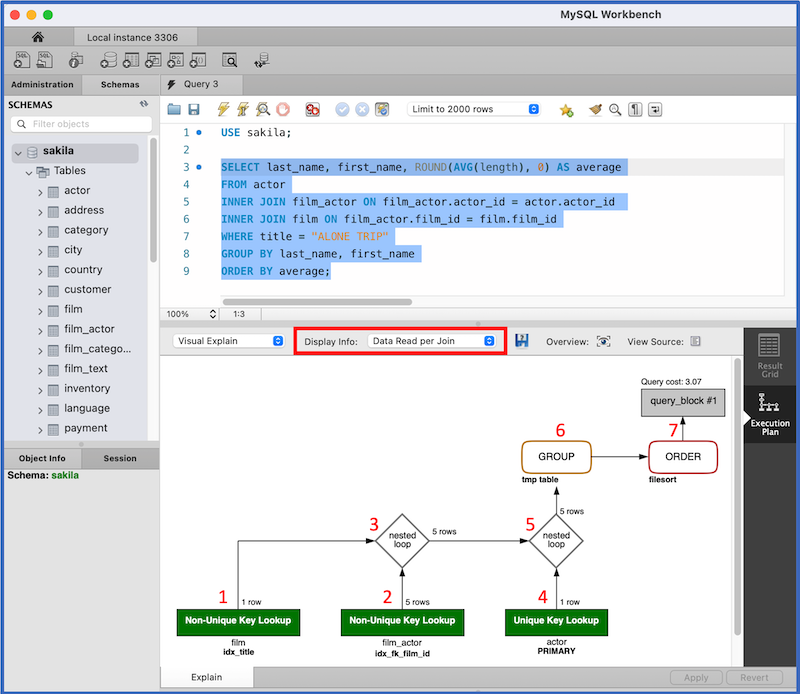
  3. In the Display Info box, highlighted in red below, select Data Read per Join.

Workbench displays the following execution plan:

Image is a screenshot of Workbench. The SELECT query described in the lab instructions is highlighted. Below the SELECT query is a flowchart diagram, representing an execution plan for the SELECT query. The flowchart contains boxes and diamonds labeled 1 through 7. Box 1 has four labels: 1 row, Non-Unique Key Lookup, film, and idx_title. Box 2 has four labels: 5 rows, Non-Unique Key Lookup, film_actor, and idx_fk_film_id. Diamond 3 has two labels: 5 rows, and nested loop. Arrows from boxes 1 and 2 point to diamond 3. Box 4 has four labels: 1 row, Unique Key Lookup, actor, and PRIMARY. Diamond 5 has two labels: 5 rows, and nested loop. Arrows from diamond 3 and box 4 point to diamond 5. Box 6 has two labels: GROUP, and tmp table. Box 7 has two labels: ORDER and filesort. An arrow from box 6 points to box 7. An arrow from box 7 points to an unnumbered box with two labels: Query cost 3.07, and query_block #1.

The execution plan depicts the result of EXPLAIN for the SELECT query. The execution plan has seven steps, corresponding to the red numbers on the screenshot:

  1. Access a single film row using the idx_title index on the title column.
  2. Access matching film_actor rows using the idx_fk_film_id index on the film_id foreign key.
  3. Join the results using the nested loop algorithm.
  4. Access actor rows via the index on the primary key.
  5. Join actor rows with the prior join result using the nested loop algorithm.
  6. Store the result in a temporary table and compute the aggregate function.
  7. Sort and generate the result table.

Refer to MySQL nested loop documentation for an explanation of the nested loop algorithm.

Now, replace = in the WHERE clause with < and generate a new execution plan. Step 1 of the execution plan says Index Range Scan. The index scan accesses all films with titles preceding “ALONE TRIP”, rather than a single film.

Finally, replace < in the WHERE clause with > and generate a third execution plan. Step 1 of the execution plan says Full Table Scan and accesses actor rather than film.

zyLab coding

In the zyLab environment, write EXPLAIN statements for the three queries, in the order described above. Submit the EXPLAIN statements for testing.

The zyLab execution plans do not exactly match the Workbench execution plans, since this lab uses a subset of film, actor, and film_actor rows from the Sakila database.

NOTE: In submit-mode tests that generate multiple result tables, the results are merged. Although the tests run correctly, the results appear in one table.

Needs help with similar assignment?

We are available 24x7 to deliver the best services and assignment ready within 3-4 hours? Order a custom-written, plagiarism-free paper

Get Answer Over WhatsApp Order Paper Now

python


Problem 1: Car Class

  1. Write a class named Car that has the following data attributes:
    • __year_model (for the car’s year model)
    • __make (for the make of the car)
    • __speed (for the car’s current speed)
    • The Car class should have an __init__ method that accepts the car’s year model and make as arguments. These values should be assigned to the object’s __year_model and __make data attributes. It should also assign 0 to the __speed data attribute.
      The class should also have the following methods:
    • accelerate
      The accelerate method should add 5 to the speed data attribute each time it is called.
    • brake
      The brake method should subtract 5 from the speed data attribute each time it is called.
    • get_speed
      The get_speed method should return the current speed.
    • Next, design a program that creates a Car object and then calls the accelerate method five times. After each call to the accelerate method, get the current speed of the car and display it. Then call the brakemethod five times. After each call to the brake method, get the current speed of the car and display it.

Problem 2: Personal Information Class

  1. Design a class that holds the following personal data: name, address, age, and phone number. Write appropriate accessor and mutator methods. Also, write a program that creates three instances of the class. One instance should hold your information, and the other two should hold your friends’ or family members’ information.

Needs help with similar assignment?

We are available 24x7 to deliver the best services and assignment ready within 3-4 hours? Order a custom-written, plagiarism-free paper

Get Answer Over WhatsApp Order Paper Now

Reading Assignment

Chapter(15) reading assignment one-page write-up 

Needs help with similar assignment?

We are available 24x7 to deliver the best services and assignment ready within 3-4 hours? Order a custom-written, plagiarism-free paper

Get Answer Over WhatsApp Order Paper Now

Scientific Computing I-Muller’s method or Bairstow’s method

NEED PYTHON CODE

For each of the following polynomials, apply either the Muller’s method or the Bairstow’s method to find all real or complex roots. Analyze and contrast performance between the two methods. Plot the functions to choose root guesses appropriately. You can apply any simplifications you deem appropriate prior to applying the numerical methods.

1. f(x) = x^3 – x^2 + 2x – 2   

2. f(x) = 2x^4 + 6x^2 + 8   

3. f(x) = -2 + 6.2^x – 4x^2 + 0.7x^3   

4. f(x) = x^4 – 2x^3 + 6x^2 – 2x + 5

TEXTBOOK

https://www.academia.edu/31722261/Numerical_Methods_for_Engineers_7th_Edition_steven_chapra

Needs help with similar assignment?

We are available 24x7 to deliver the best services and assignment ready within 3-4 hours? Order a custom-written, plagiarism-free paper

Get Answer Over WhatsApp Order Paper Now

DFC 610-Cyber Foundations


Your goal for the presentation is to convince the leadership that adopting a security vulnerability assessment tool (such as MBSA) and providing an extra security layer is a must for the company.

The deliverables for this project are as follows:

Security Assessment Report (SAR): This report should be a 7-8 page double-spaced Word document with citations in APA format. The page count does not include figures, diagrams, tables, or citations.

Nontechnical presentation: This is a set of 8-10 PowerPoint slides for upper management that summarizes your thoughts regarding the findings in your SAR.

Needs help with similar assignment?

We are available 24x7 to deliver the best services and assignment ready within 3-4 hours? Order a custom-written, plagiarism-free paper

Get Answer Over WhatsApp Order Paper Now

Bid Response Proposal


The objective is to present a Bid Response Proposal that provides a security solution for any business process of your choice. The financial business has 60 employees and is struggling with security issues both internal and external. Employees use laptops and have remote access to the office systems. Your Bid Response needs to be a turnkey solution that will provide a solution to but not limited to the following problems (so be creative):

1) Equipment is disappearing

2) No building or computer room security.

3) No policies (AUP)

4) No virus protection and experiencing viruses daily

5) No intrusion detection and experiencing intrusions daily 

6) Passwords compromised 

7) There is an Internet connection but no protection and content filtering

8) Sensitive information is being copied from systems

9) If a disaster should happen to the building there are no plans to recover

Minimum topics to be included in your Bid Response Proposal are the following:

  1. Deliver      a Bid Response Proposal to provide a business security solution to      prevent malicious or unauthorized use of digital assets
  2. Create      and implement effective policies to mitigate risks
  3. Deliver      a detailed list of security products and pricing
  4. Provide      safeguards for the information assets

Format:

Format for the project should be a 15-20 slide PowerPoint presentation with a budget sheet.

Resources:


www.cisco.com

www.dell.com

Security Handout

www.infoworld.com/article/03/12/19/50FErevsec_1.html (68 security products)


www.hp.com

www.veritas.com

www.sungard.com

Needs help with similar assignment?

We are available 24x7 to deliver the best services and assignment ready within 3-4 hours? Order a custom-written, plagiarism-free paper

Get Answer Over WhatsApp Order Paper Now

Assignment 4: Fake News

Complete the “Try This” activity from GCF’s Practice Evaluating Information.


Watch the videos listed below. Note the key points as you view the videos.  


New  York Magazine’s Max Read discusses his piece examining the rise of  “fake news” and whether the internet is a reliable tool for furthering  democracy. 

Cole  Bolton and Chad Nackers talked about their satirical publication, The  Onion, and the intent of political satire versus misinformation.  


Alicia Shepard discusses emotional reactions to “click-bait” style news, which may or may not be true.

Answer the following questions using complete sentences. 

  1. How is a particular audience targeted?
     
  2. What types of news can be created?
     
  3. Who could be the sources of “Fake News?”
     

  1. What could be the goals of the creators? 
     
  2. Explain how you can identify fake news and how it can possibly affect the public
     

Submission Format:

  • Answer each question individually and clearly label your answer, 1 thru 5
  • For  full credit, each answer must have a minimum of 5 complete sentences.   Be careful to avoid spelling and grammar errors which will cost points.
  • Your completed responses should be submitted in a Word document with 1″ margins. 
  • Use 12 point Arial font and double space the text. 
  • Place your name in the header on the top left.  
  • If you use additional resources, properly cite the sources using APA style.  

Needs help with similar assignment?

We are available 24x7 to deliver the best services and assignment ready within 3-4 hours? Order a custom-written, plagiarism-free paper

Get Answer Over WhatsApp Order Paper Now

Discussion and Assignment


ESSAY TYPE QUESTION (NOT AN ESSAY) (3 QUESTIONS GIVEN (1 DISCUSSION AND 2 EXERCISE  ) 

–  PROVIDE  APPROPRIATE  ARGUMENT  FOR  THE RESPONSE. 

 – INSTRUCTION ARE ATTACHED. PLEASE FOLLOW DISCUSSION GUIDELINES FOR DISCUSSION AND ASSIGNMENT GUIDELINE FOR ASSIGNMENT.

– SHOULD STRICTLY FOLLOW THE INSTRUCTIONS. 

– LIMIT TO ONE PAGE FOR QUESTION (DOUBLE-SPACED)

– NEED PLAGIARISM REPORT ALONG WITH WORK. *****

– APA FORMAT, IN TEXT CITATION 

Needs help with similar assignment?

We are available 24x7 to deliver the best services and assignment ready within 3-4 hours? Order a custom-written, plagiarism-free paper

Get Answer Over WhatsApp Order Paper Now

Help Please!!! Problem Solving Cases In Microsoft Access & Excel – 15th Edition – Case 6


Problem

CREATING A SPREADSHEET FOR DECISION SUPPORT

In this assignment, you will produce a spreadsheet that models Philly Landscaping’s estimated 2017 revenues, expenses, and profits; provides forecasts of 10 years of cash flows for the company; and allows for the input of other variables to answer Steve’s questions. In Assignment 2, you will use your spreadsheet to gather data and then write a memorandum that documents your analysis and findings. In Assignment 3, you will prepare and give an oral presentation of your analysis and conclusions to Steve.

First, you need to create the spreadsheet model based on your conversations with Steve and your understanding of the questions he would like to have answered. The model will cover 11 years—2017 as the base year and 10 subsequent years as requested by the bank to provide estimated cash flows. This section helps you set up each of the following spreadsheet components before entering cell formulas:

• Constants
• Inputs
• Summary of Key Results
• Calculations

A discussion of each section follows. The spreadsheet skeleton for this case is available for you to use; it will save you time. To access the spreadsheet skeleton, go to your data files, select Case 6, and then select

Philly Landscaping.xlsx.

Constants Section

Your spreadsheet should include the constants, otherwise known as assumptions, shown in Figure 6-1. An explanation of the line items follows the figure.

• Prices—These prices are based on averages that Steve provided.
• Rough Yard Work per Square Foot
• Gutter Cleaning per Linear Foot
• Power Washing per Square Foot
• Lawn Mowing and Edging per Square Foot
• Driveway Seal Coating per Square Foot
• Fall Leaf Clearing per Square Foot
• Snow Removal per Square Foot
• Costs—The average cost of labor and materials is based on averages Steve provided from previous years.
• Customer Base—These values show the company’s current number of customers and average lot coverage areas for various company services. Most of these averages are shown in square footage (Sq Ft).
• Customers—This value shows the number of customers currently served by the company.
• Average Lawn Surface (Sq Ft)
• Average Power Washing Surface (Sq Ft)
• Average Gutter Length (Linear Ft)
• Average Snow Removal Surface (Sq Ft)
• Average Driveway Seal Coating Surface (Sq Ft)
• Average Fall Leaf Clearing Surface (Sq Ft)
• Economic and Environmental Factors—Based on conversations with his accountant, Steve feels comfortable using a 25 percent tax rate for the model.

Inputs Section

As Steve explained earlier, he would like to answer some important questions to determine his best option for retirement. First, the model needs to evaluate the impact of the loan on the customer base’s growth. Second, the model needs to evaluate the repayment of the loan if it is approved. Finally, Steve has different ideas on how much money he will need to retire comfortably; he thinks an amount between $75,000 and $100,000 annually would be sufficient. The DSS will determine whether these options are viable.

Your spreadsheet should include the following inputs, as shown in Figure 6-2. Note that the spreadsheet extends to 2027, as explained earlier, but the remaining figures in this case have been cropped to fit the page.

• Customer Base Change %—This value is the expected change in the size of the customer portfolio. The value could be positive, negative, or zero starting in 2017.
• Annual Payments For Loan—The bank’s loan officer has provided an estimate of an annual total payment of $120,000 for a loan of $1 million with a 3 percent interest rate over 10 years.
• Annual Income Required For Retirement—This value represents what Steve is willing to accept as annual retirement income.

Summary of Key Results Section

Your spreadsheet should include the results shown in Figure 6-3. A general explanation of this section follows

the figure.

For each year starting in 2017, this section should include values that are already calculated elsewhere in the spreadsheet. The formulas in the Summary of Key Results section will echo results from throughout your model; no long or complicated formulas need to be used in this section. The purpose of gathering the results together is to make for an easier job when configuring Scenario Manager later.

Calculations Section

To create an accurate decision tool, you should calculate intermediate results that will be used to determine the year-end numbers needed for the model. It is generally a good idea to arrive at these final numbers in a series of steps rather than in one short calculation. Errors are easier to identify if the steps are broken out, and it also makes troubleshooting a breeze. The calculations shown in Figures 6-4, 6-5, and 6-6 are based on 2017 values in the Constants section (Customer Base values and prices); starting in 2018, the calculations take into account the inputs from each scenario. When called for, use absolute referencing properly. Values must be computed by cell formula; hard-code numbers in formulas only when you are told to do so. Cell formulas should not reference a cell with a value of “NA.”

An explanation of each item in this section follows the figure in which the item is shown.

• Rough Yard Work—The product of the average lawn surface and the number of customers. Steve tells you that only 25 percent of customers request this service. Format cells for numbers with zero decimals.
• Lawn Mowing and Edging—The product of the average lawn surface and the number of customers. Steve tells you that only 25 percent of customers request this service. Format cells for numbers with zero decimals.
• Power Washing—The product of the average power washing surface and the number of customers. Format cells for numbers with zero decimals.
• Gutter Cleaning—The product of the average gutter length and the number of customers. Format cells for numbers with zero decimals.
• Snow Removal—The product of the average snow removal surface and the number of customers. Format cells for numbers with zero decimals.
• Driveway Seal Coating—The product of the average driveway seal coating surface and the number of customers. Format cells for numbers with zero decimals.
• Fall Leaf Clearing—The product of the average lawn surface and the number of customers. Steve tells you that 75 percent of customers request this service. Format cells for numbers with zero decimals.

• Rough Yard Work—Total expected revenue multiplied by the unit price in the Constants section. Format cells for currency with zero decimals.
• Lawn Mowing and Edging—Total expected revenue multiplied by the unit price in the Constants section. Format cells for currency with zero decimals.
• Power Washing—Total expected revenue multiplied by the unit price in the Constants section. Format cells for currency with zero decimals.
• Gutter Cleaning—Total expected revenue multiplied by the unit price in the Constants section. Format cells for currency with zero decimals.
• Snow Removal—Total expected revenue multiplied by the unit price in the Constants section. Format cells for currency with zero decimals.
• Driveway Seal Coating—Total expected revenue multiplied by the unit price in the Constants section. Format cells for currency with zero decimals.
• Fall Leaf Clearing—Total expected revenue multiplied by the unit price in the Constants section. Format cells for currency with zero decimals.
• Total Revenue—The sum of all revenues for the year. Format cells for currency with zero decimals.

• Labor and Materials—Based on current estimates, the annual expense for labor and materials is $500,000. This number will need to be updated based on customer base changes starting in 2018. Format cells for currency with zero decimals.
• Loan Repayment—Repayment would start in 2018 if the loan offer is approved. Format cells for currency with zero decimals.
• Total Expense—The sum of labor and materials and the loan repayment. Format cells for currency with zero decimals.
• Income Before Taxes—The difference between total revenue and total expense. Format cells for currency with zero decimals.
• Tax Expense—The tax liability based on the tax rate in the Constants section. Format cells for currency with zero decimals.
• Net Income—The difference between net income before taxes and tax expense. Format cells for currency with zero decimals.
• Enough Income to Hire Manager?—Starting in 2018, if the difference between net income and the amount required to retire is over $50,000, enter “Yes.” Otherwise, enter “No.”
• Income Over Expected Annuity Earnings?—Starting in 2018, if net income is greater than the estimated annuity value ($100,000), enter “Yes.” Otherwise, enter “No.”

Using the Spreadsheet to Gather Data

You have built the spreadsheet to model several possible situations. For each of the four test scenarios, you want to know the annual cash flow, whether Steve will be able to hire a general manager, and whether income from the company surpasses the estimated annuity value.

You will run “what-if” scenarios with the four sets of input values using Scenario Manager. (See Tutorial C for details on using Scenario Manager.) Set up the four scenarios. Your instructor may ask you to use conditional formatting to make sure your input values are proper. Note that in Scenario Manager you can enter noncontiguous cell ranges, such as C19, D19, C20:F20.

The relevant output cells are Annual Income, Enough Income to Hire Manager?, and Income Over Expected Annuity Earnings? from 2018 to 2027. All of these cells are shown in the Summary of Key Results section. Run Scenario Manager to gather the data in a report. When you finish, print the spreadsheet with the input for any of the scenarios, print the Scenario Manager summary sheet, and then save the spreadsheet file a final time.

Documenting Your Results in a Memo

Use Microsoft Word to write a brief memo that documents your analysis and results. You can address the memo to Steve, the owner of Philly Landscaping. Observe the following requirements:

• Set up your memo as described in Tutorial E.
• In the first paragraph, briefly state the business situation and the purpose of your analysis.
• Next, describe the scenarios tested.
• State your conclusions.
• Support your statements graphically, as your instructor requires. Your instructor may ask you to return to Excel and copy the results of the Scenario Manager summary sheet into the memo. You should include a summary table built in Word based on the Scenario Manager summary sheet results. (This procedure is described in Tutorial E.)
• Your table should have the format shown in Figure 6-7.

Needs help with similar assignment?

We are available 24x7 to deliver the best services and assignment ready within 3-4 hours? Order a custom-written, plagiarism-free paper

Get Answer Over WhatsApp Order Paper Now